|[English](README.md)|[Română](README.ro.md)|
|--------------------|----------------------|
# Font Manager  A simple font management application for GTK Desktop Environments
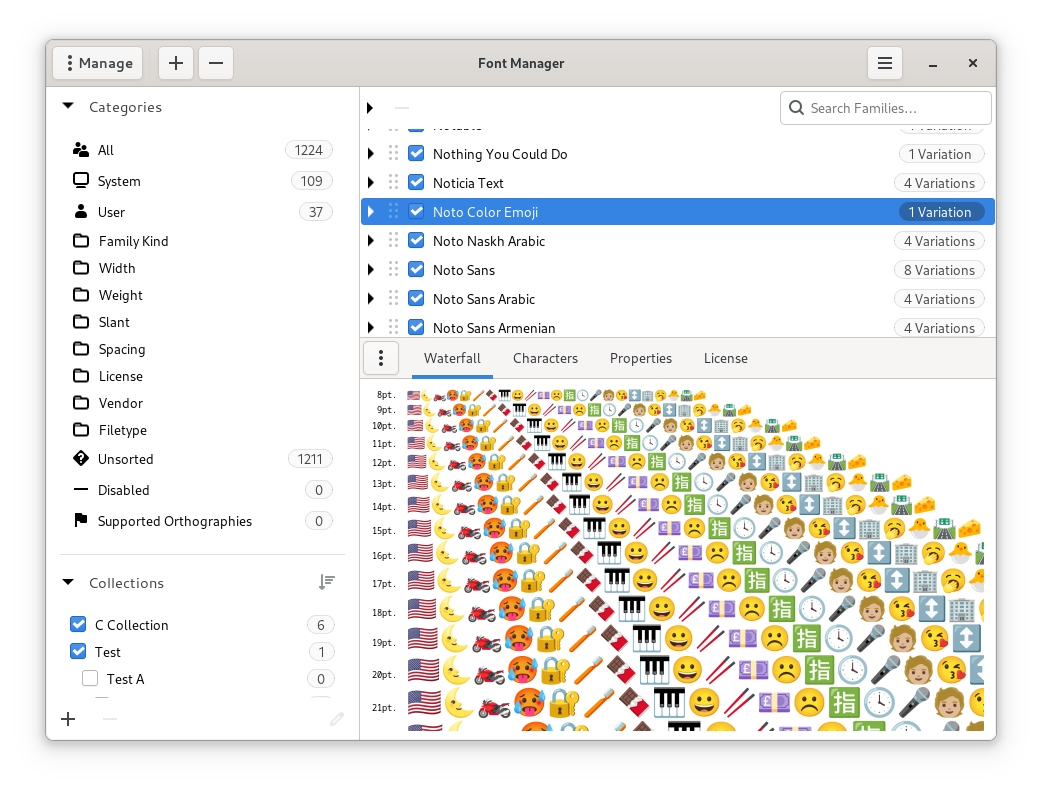
Font Manager is intended to provide a way for average users to easily manage desktop fonts, without having to resort to command line tools or editing configuration files by hand. While designed primarily with the Gnome Desktop Environment in mind, it should work well with other GTK desktop environments.
Font Manager is NOT a professional-grade font management solution.
## Features
- Preview and compare font files
- Activate or deactivate installed font families
- Automatic categorization based on font properties
- Google Fonts Catalog integration
- Integrated character map
- User font collections
- User font installation and removal
- User font directory settings
- User font substitution settings
- Desktop font settings (GNOME Desktop or compatible environments)
## Localization
Font Manager is being translated using [Weblate](https://weblate.org), a web tool designed to ease translating for both developers and translators.
If you would like to help this application reach more users in their native language please visit the [project page on Weblate](https://hosted.weblate.org/engage/font-manager/).
A simple font management application for GTK Desktop Environments

Font Manager is intended to provide a way for average users to easily manage desktop fonts, without having to resort to command line tools or editing configuration files by hand. While designed primarily with the Gnome Desktop Environment in mind, it should work well with other GTK desktop environments.
Font Manager is NOT a professional-grade font management solution.
## Features
- Preview and compare font files
- Activate or deactivate installed font families
- Automatic categorization based on font properties
- Google Fonts Catalog integration
- Integrated character map
- User font collections
- User font installation and removal
- User font directory settings
- User font substitution settings
- Desktop font settings (GNOME Desktop or compatible environments)
## Localization
Font Manager is being translated using [Weblate](https://weblate.org), a web tool designed to ease translating for both developers and translators.
If you would like to help this application reach more users in their native language please visit the [project page on Weblate](https://hosted.weblate.org/engage/font-manager/).
 ## Installation
### Distribution packages
#### Arch User Repository
Arch Linux users can install [`font-manager`](https://archlinux.org/packages/extra/x86_64/font-manager/) from official repositories:
```bash
pacman -S font-manager
```
#### Fedora COPR
[](https://copr.fedorainfracloud.org/coprs/jerrycasiano/FontManager/package/font-manager/)
Fedora packages built from latest revision:
```bash
dnf copr enable jerrycasiano/FontManager
dnf install font-manager
```
#### Gentoo
Gentoo users may find [`font-manager`](https://github.com/PF4Public/gentoo-overlay/tree/master/app-misc/font-manager) in [::pf4public](https://github.com/PF4Public/gentoo-overlay) Gentoo overlay
#### Ubuntu Personal Package Archive
Ubuntu packages built from latest revision:
```bash
sudo add-apt-repository ppa:font-manager/staging
sudo apt-get update
sudo apt-get install font-manager
```
#### File Manager extensions
Fedora and Ubuntu users can also find extensions for Nautilus, Nemo and Thunar in the repositories.
The extension currently allows you to quickly preview font files by simply selecting them in the file manager while font-viewer is open and also adds an option to install font files in the file manager context menu.
The Thunar extension also has very basic bulk renamer support.
### Building from source
You'll need to ensure the following dependencies are installed:
- `meson >= 1.1.0`
- `ninja`
- `glib >= 2.62`
- `vala >= 0.56`
- `freetype2 >= 2.10`
- `gtk+-4.0 >= 4.12`
- `json-glib-1.0 >= 1.5`
- `libxml-2.0 >= 2.9.10`
- `sqlite3 >= 3.35`
- `gobject-introspection`
- `yelp-tools (optional)`
- `gettext (optional)`
Support for compressed files, which is enabled by default, requires:
- `libarchive >= 3.7`
Google Fonts integration, which is enabled by default, requires the following libraries:
- `webkitgtk-6.0 >= 2.4`
- `libsoup3 >= 3.2`
If you wish to also build file manager extensions, you will need corresponding development libraries:
- `libnautilus-extension`
- `libnemo-extension`
- `thunar`
Adwaita stylesheet support is available as a build option, which is disabled by default, if enabled you will need the Adwaita library installed:
- `libadwaita-1`
You will also have to enable the option in the Interface section of the preference pane.
Adwaita support is limited to styling, no other components are used at this time.
To build the application:
```bash
meson setup --prefix=/usr --buildtype=release build
cd build
ninja
```
To run the application without installing:
```bash
src/font-manager/font-manager
```
To install the application:
```bash
sudo ninja install
```
To uninstall:
```bash
sudo ninja uninstall
```
For a list of available build options:
```bash
meson configure
```
To change an option after the build directory has been configured:
```bash
meson configure -Dsome_option=true
```
## License
This project is licensed under the GNU General Public License Version 3.0 - see
[COPYING](COPYING) for details.
## Acknowledgements
- Karl Pickett for getting the ball rolling with [fontmanager.py](https://raw.githubusercontent.com/FontManager/font-manager/6b9b351538b5118d07f6d228f3b42c91183b8b73/fontmanager.py)
- The compare mode in Font Manager is modeled after [gnome-specimen](https://launchpad.net/gnome-specimen) by Wouter Bolsterlee
- Font Manager makes use of data compiled for [Fontaine](https://www.unifont.org/fontaine/) by Edward H. Trager
- The character map in Font Manager is based on [Gucharmap](https://wiki.gnome.org/action/show/Apps/Gucharmap)
## Installation
### Distribution packages
#### Arch User Repository
Arch Linux users can install [`font-manager`](https://archlinux.org/packages/extra/x86_64/font-manager/) from official repositories:
```bash
pacman -S font-manager
```
#### Fedora COPR
[](https://copr.fedorainfracloud.org/coprs/jerrycasiano/FontManager/package/font-manager/)
Fedora packages built from latest revision:
```bash
dnf copr enable jerrycasiano/FontManager
dnf install font-manager
```
#### Gentoo
Gentoo users may find [`font-manager`](https://github.com/PF4Public/gentoo-overlay/tree/master/app-misc/font-manager) in [::pf4public](https://github.com/PF4Public/gentoo-overlay) Gentoo overlay
#### Ubuntu Personal Package Archive
Ubuntu packages built from latest revision:
```bash
sudo add-apt-repository ppa:font-manager/staging
sudo apt-get update
sudo apt-get install font-manager
```
#### File Manager extensions
Fedora and Ubuntu users can also find extensions for Nautilus, Nemo and Thunar in the repositories.
The extension currently allows you to quickly preview font files by simply selecting them in the file manager while font-viewer is open and also adds an option to install font files in the file manager context menu.
The Thunar extension also has very basic bulk renamer support.
### Building from source
You'll need to ensure the following dependencies are installed:
- `meson >= 1.1.0`
- `ninja`
- `glib >= 2.62`
- `vala >= 0.56`
- `freetype2 >= 2.10`
- `gtk+-4.0 >= 4.12`
- `json-glib-1.0 >= 1.5`
- `libxml-2.0 >= 2.9.10`
- `sqlite3 >= 3.35`
- `gobject-introspection`
- `yelp-tools (optional)`
- `gettext (optional)`
Support for compressed files, which is enabled by default, requires:
- `libarchive >= 3.7`
Google Fonts integration, which is enabled by default, requires the following libraries:
- `webkitgtk-6.0 >= 2.4`
- `libsoup3 >= 3.2`
If you wish to also build file manager extensions, you will need corresponding development libraries:
- `libnautilus-extension`
- `libnemo-extension`
- `thunar`
Adwaita stylesheet support is available as a build option, which is disabled by default, if enabled you will need the Adwaita library installed:
- `libadwaita-1`
You will also have to enable the option in the Interface section of the preference pane.
Adwaita support is limited to styling, no other components are used at this time.
To build the application:
```bash
meson setup --prefix=/usr --buildtype=release build
cd build
ninja
```
To run the application without installing:
```bash
src/font-manager/font-manager
```
To install the application:
```bash
sudo ninja install
```
To uninstall:
```bash
sudo ninja uninstall
```
For a list of available build options:
```bash
meson configure
```
To change an option after the build directory has been configured:
```bash
meson configure -Dsome_option=true
```
## License
This project is licensed under the GNU General Public License Version 3.0 - see
[COPYING](COPYING) for details.
## Acknowledgements
- Karl Pickett for getting the ball rolling with [fontmanager.py](https://raw.githubusercontent.com/FontManager/font-manager/6b9b351538b5118d07f6d228f3b42c91183b8b73/fontmanager.py)
- The compare mode in Font Manager is modeled after [gnome-specimen](https://launchpad.net/gnome-specimen) by Wouter Bolsterlee
- Font Manager makes use of data compiled for [Fontaine](https://www.unifont.org/fontaine/) by Edward H. Trager
- The character map in Font Manager is based on [Gucharmap](https://wiki.gnome.org/action/show/Apps/Gucharmap)