
What it does
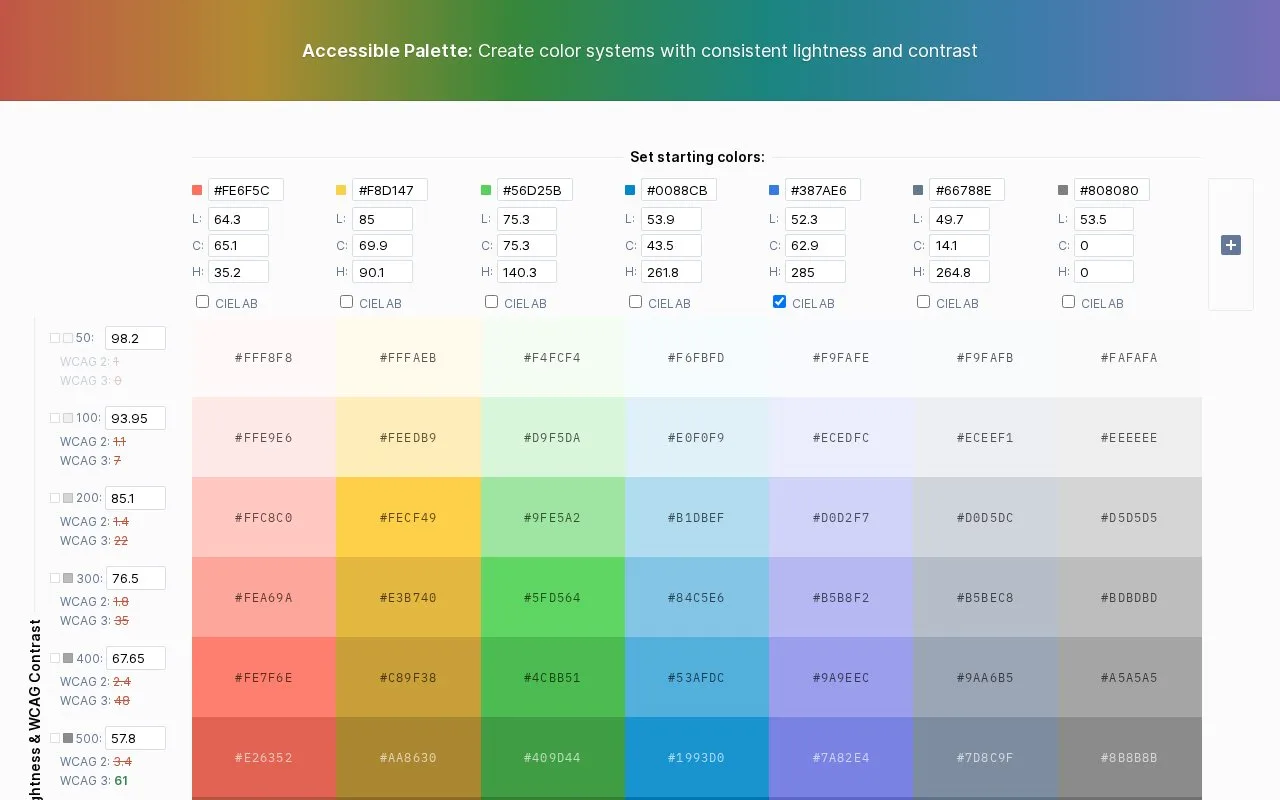
Accessible Palette creates coordinated colour ranges from starting brand colours. Its lightness levels are shared across the palette, with controls for chroma, hue and colour-space interpolation.
Paste a brand colour or adjust an existing column. Chroma controls its colour intensity, while hue changes its colour family. Set the lightness values for numbered levels to preserve important brand shades within a broader scale.
Choose RGB or CIELAB interpolation for each range. The results can differ, particularly through blue and purple. Hue compensation can also steer darker yellows toward orange instead of green.
Contrast is initially measured against white. Select any swatch to make it the comparison background, then adjust the lightness levels. The page displays both WCAG 2 ratios and an APCA comparison under its “WCAG 3” label. Its creator describes the latter as experimental draft work, so the two readings should remain distinct.
Changes are encoded in the palette URL. Keep that link with the design system to revisit the same settings.
Strengths
- Several colour families can share one set of lightness levels.
Watch out for
- The experimental contrast reading is separate from the WCAG 2 ratio.
Best for
- Extending existing brand colours into a coordinated interface palette
Sources
- Accessible Palette (Oct 27, 2026)
- Accessible Palette: stop using HSL for color systems (Oct 27, 2026)