What it does
Xfig constructs technical figures from editable lines, splines, shapes and labels. It saves FIG documents and uses the companion fig2dev converter for other outputs.
Build an annotated mechanism from geometric objects, then use object depths to control overlaps. Images can be embedded for annotation, while FIG output from a plotting program can supply graphs that Xfig itself does not calculate.
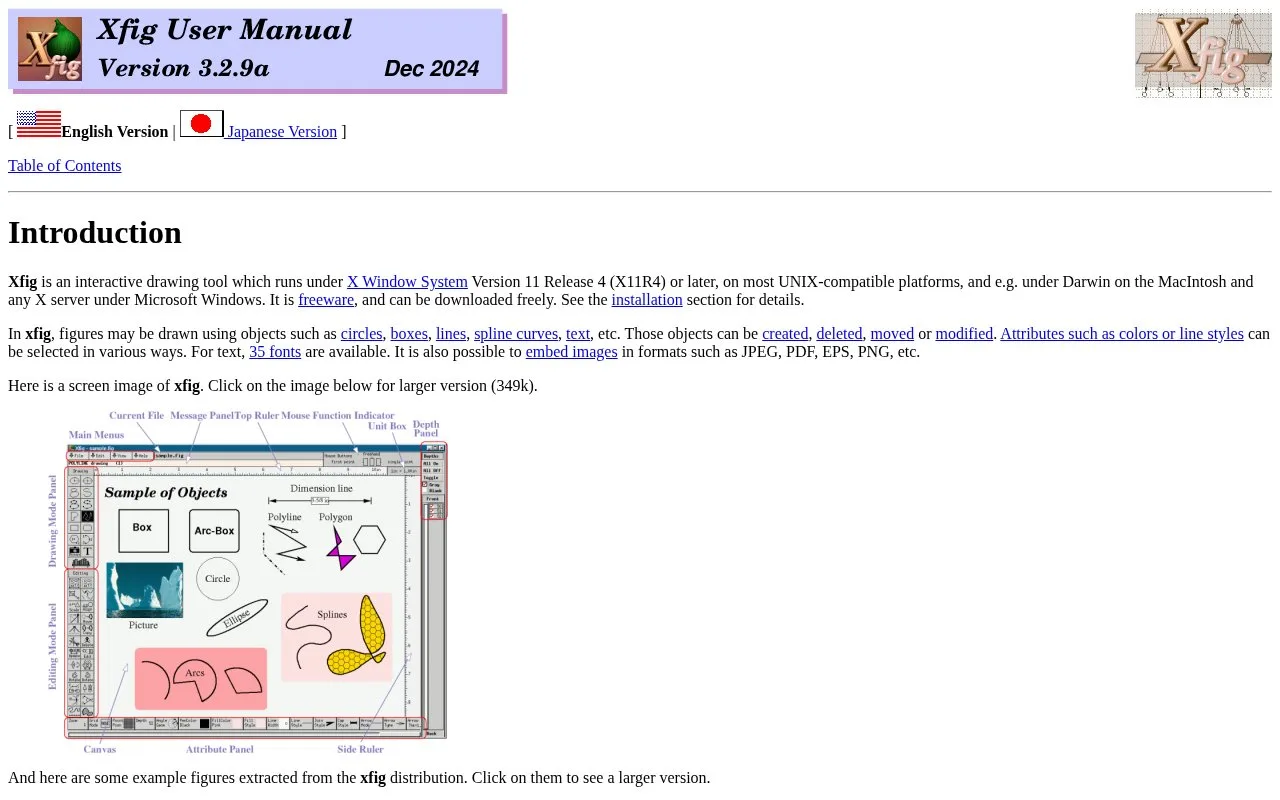
The interface runs through X11 and changes mouse-button functions with the active mode. An on-screen indicator shows those functions. Keep both Xfig and fig2dev available: exporting depends on the converter.
File > Export selects an output language such as PDF, PNG or TikZ. Character support differs across formats. SVG and TikZ can use the available Unicode glyphs, while PDF, PostScript and bitmap routes have narrower documented language support. A representative label is therefore a useful first export for a multilingual figure.
The software's permissive licence allows modification and redistribution with the copyright notice retained.
Strengths
- Separate objects support continued figure revisions
- FIG connects drawing work with external plotting tools
Watch out for
- Export requires a separate converter
- Text support depends on the chosen output format
Best for
- Object-based technical diagrams in an X11 workflow
Sources
- Xfig introduction and interface (Oct 27, 2026)
- Xfig printing and export (Oct 27, 2026)
- Xfig copyright and permission notices (Oct 27, 2026)